
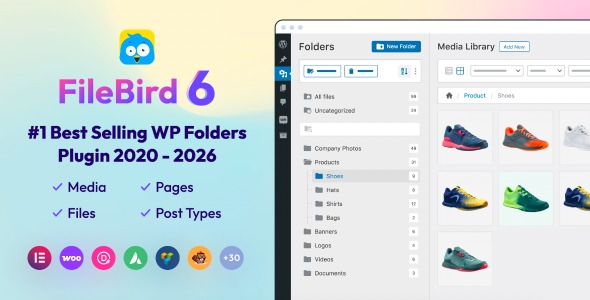
FileBird – WordPress Media Library Folders

Version Download:
Demo: Live Preview
License: Unlimited websites
Please read before purchase: FAQ
Original price was: $149.00.$44.00Current price is: $44.00.
Do you have thousands of files in your WordPress media library? And you’re struggling to keep them organized?
We get it, that’s exactly the mess FileBird – WordPress Media Library Folders was built to fix. 200,000+ WP website owners already use it to bring order to their media, pages, posts, WooCommerce products, and more. 😉
HOW IT WORKS
Running a WordPress site means uploading images, videos, audio, PDFs, and docs day after day, until your media library becomes an unsearchable pile. FileBird gives you unlimited virtual folders, drag and drop uploads and moves, and a hierarchical view that puts any file within a few clicks’ reach.
FEATURES
DRAG AND DROP INTERFACE
Move files and folders natively, in a click, with none of the friction of legacy uploaders.
ORGANIZE PAGES, POSTS, & CUSTOM POST TYPES
Not just media: categorize posts, products, events, members, campaigns, and Elementor templates too.
DOWNLOAD MEDIA FOLDERS AS ZIP
Export entire folders in one click for backup, sharing, or offline use.
FILEBIRD CLOUD INTEGRATION SUPPORTED
This core plugin is compatible with FileBird Cloud plugin, which connects your WordPress Media Library with Google Drive and Dropbox. Access cloud files directly from your WordPress dashboard, use cloud based media just like WP media uploads, and save server space.
FOLDER THEMES
There are 3 themes you can choose for your FileBird folder tree skins: FileBird Default, Windows 11, and Dropbox. Want more? Just let us know!
FOLDER COLORS
Don’t want to see monotone colors? Choose from 16+ preset colors, or use custom HEX colors for a perfect match.
NEW FILE COUNTER
Each user can keep track of newly uploaded media assets for easy reference. The file counter can be switched between counting files per single folder, and counting per parent folder with nested folders.
SUPERIOR FILE BROWSER IN PAGE BUILDERS
Open the page builder you’re using, insert an image element, and browse files directly in the same interface as FileBird’s native media library folders.
User Reviews
Be the first to review “FileBird – WordPress Media Library Folders”
Related Products

Dogart – Personal Portfolio WordPress Theme

WooCommerce NFT Importer 1.0.11

Ealain | Digital Artist Creative Portfolio WordPress Theme + Figma



There are no reviews yet.